MouthPad lets your tongue control a computer
MouthPad lets your tongue control a computer
Computer mice have taken plenty of unusual forms over the years. Now, one of the most interesting alternatives skips your hands altogether.
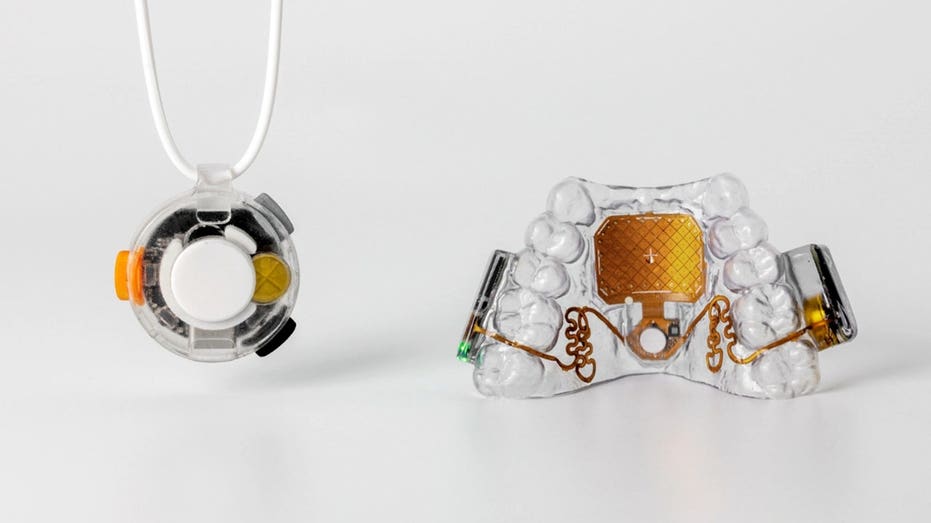
San Francisco-based Augmental Technologies has developed the MouthPad, a custom-fit touchpad that sits inside your mouth and lets you control a computer, smartphone or tablet using your tongue or head. The company describes it as the world's first hands-free touchpad.
It looks a little like a slim dental retainer. However, tucked inside is technology designed to turn subtle movements into cursor control. The concept has an important purpose. Augmental developed MouthPad to give people with another way to interact with everyday technology. The company says it worked with hundreds of users with different abilities while developing the device. So how do you actually control a computer with your mouth, and what is it like to use? Here's how MouthPad works.
New! Free live CyberGuy class: Protect Your Money From Todays Biggest Threats
Join us Saturday, August 29, at 10 AM ET for a free CyberGuy LIVE class covering five simple steps to help defend yourself against AI scams, fraud, identity theft and financial hacks. Kurt "CyberGuy" Knutsson will explain how to set up bank alerts, strengthen your account logins, protect your phone number, freeze your credit and help secure your retirement savings against unauthorized transfers. No technical experience is needed. Youll also receive our financial protection checklist, and every registrant will get a link to the class recording afterward.
Reserve your free spot today at CyberGuyLive.com.
COULD A PAINT-ON ELECTRONIC TATTOO SPOT HEART ATTACKS?
MouthPad sits over your upper teeth, with a pressure-sensitive touchpad positioned against the roof of your mouth. Move your tongue across the touchpad, and you can move the cursor. You can also use head movements instead. Tongue presses can perform a left-click or click-and-drag, while a sip gesture can trigger a right-click. MouthPad also supports scrolling and swiping. So, once you get used to the controls, your tongue effectively takes over many of the jobs normally handled by your fingers on a mouse or trackpad. The device connects wirelessly like a Bluetooth mouse. That means you do not need a special receiver sticking out of your computer.
Compatibility is one of MouthPad's more useful features. Augmental lists support for macOS, Windows, Linux, iOS and Android. The companion app is available for macOS, Windows and iOS. You can also pair MouthPad with multiple devices and switch between them. Inside the companion app, you can adjust settings such as cursor speed, touch sensitivity and click strength. You can also change scrolling behavior. Those preferences are stored on the MouthPad itself, allowing you to move between compatible devices without starting your setup from scratch.
That was one of my first questions. According to Augmental, MouthPad's custom design minimizes its impact on speech. The company says users can speak or use voice-recognition software while wearing it. However, Augmental also acknowledges that results vary. Some people may need more time to adjust to speaking normally with the device in their mouth. Comfort will vary too. Augmental says team members and early users have worn MouthPad for as long as 10 hours in a day. Still, the company notes that comfort depends on factors including the shape of your mouth and how you use the device. The MouthPad








 28.6c
28.6c